
Free 
Classic Roadster | Laser Cut Model for 3mm Plywood
MakerWorld


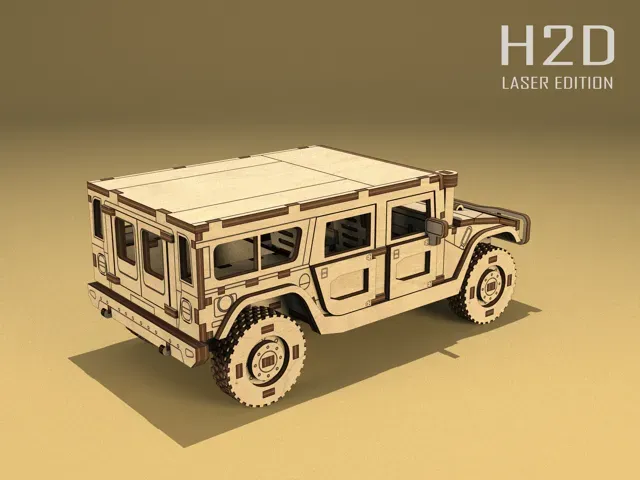
Take your laser cutting skills to the next level with this detailed Hummer H1 model, designed at 1:24 scale for 3 mm plywood. With interlocking parts and realistic proportions, this laser-cut project is perfect for hobbyists who enjoy mechanical style and precision assembly.
Model Dimensions (Assembled): • Length: 202 mm • Width: 113 mm • Height: 83 mm
Material Requirements: • 3 mm plywood • Designed to fit laser beds like Bambu Lab H2D • Includes fully prepared .LAC file with optimized cut settings
Design Features: • Authentic Hummer H1 shape and scale • Movable elements and rugged body details • Precise fit with tab-slot assembly • Medium to advanced difficulty level
File Formats: • LAC for Bambu Studio • SVG included
If you’re a fan of military vehicles or just love laser-cut wooden models, this build offers a rewarding challenge and a striking result.
3mm Birch Plywod | H2D Instructions for H2D Users:
This model is fully optimized for the Bambu Lab H2D Laser Edition . LAC file with cut offset settings for clean 3 mm plywood cutting. The model is designed for 3 mm thick plywood .
If any part feels slightly loose in the tongue-and-groove joints, simply use a small drop of super glue to improve stability.
Instructions for SVG file without kerf:
If your material thickness differs from 3 mm (e.g., 2.7 mm or 3.2 mm), you’ll need to scale the files accordingly before cutting. For example, with 2.7 mm plywood, select all sheets and scale down to 90% (since 2.7 mm is 10% thinner than 3 mm).
To avoid wasting material, you can test fit using my special kerf-calibration parts , available in my MakerWorld model library.
Before you start cutting: I highly recommend checking the fit of the tab-and-slot joints before cutting the full model. This simple step can help you avoid wasting material and time, especially if your plywood is not exactly 3 mm thick.
To help with this, I’ve included a test file on my page that lets you quickly check engraving quality and confirm that the joints are snug enough for your material.
Tip for H2D users: For 3 mm plywood, I recommend setting a Cut Offset of 0.1 mm for best results.
Take a moment to test first – it’s a small effort that makes a big difference!









Names are used only to indicate the source of a result. Polyzon is not affiliated with the listed sites.