
Free 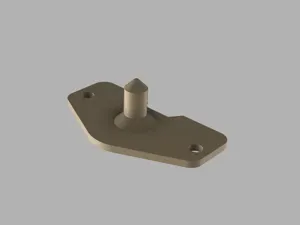
Cartographer 3D / Beacon 3D Simple Offset Tool
MakerWorld

I love the Cartographer 3D probe, but I had some trouble getting the offset configured correctly. While there’s an offset tool available, it didn’t quite suit my specific needs.
To solve this, I designed a simple but helpful tool to accurately determine the X and Y positions.
Usage:
- Place the tool on your mount. - Mark a point on your print bed (e.g., using a small piece of tape). - Move the nozzle directly over the marked point, and keep the X/Y values in mind. - Move the Offset Tool over the same marked point. - Note the X and Y values and calculate your offset. I’ve kept the explanation brief—if you’re familiar with the process, you should already know how to calculate the offset using these values. If you need help, feel free to ask in the comments or do a short google search.
Note: You can't use this tool, to get the perfect height for touch mode, the perfect height is from 2.6mm - 3.0mm, to get this height perfectly adjusted, i recommend this model:
https://www.printables.com/model/1060868-cartographer-probe-nozzle-offset-tool
as in the cartographer3D manual is mentioned. If ur mount is lined up straight with your nozzel, you can use this tool to get the offset easier as with my model. fyi
I personally use the Cartographer 3D, but as far as I know, the Beacon 3D works the same way, so this tool should be compatible.
print in pla should work fine, but u can use any other material if you like or have in ur printer. Print time is around 10-15 min, and my slicer shows only 1.44 gr of filament.






Names are used only to indicate the source of a result. Polyzon is not affiliated with the listed sites.