
Free 
Dell Optiplex SFF (2015-2020) motherboard to (Micro) ATX adapter
Printables

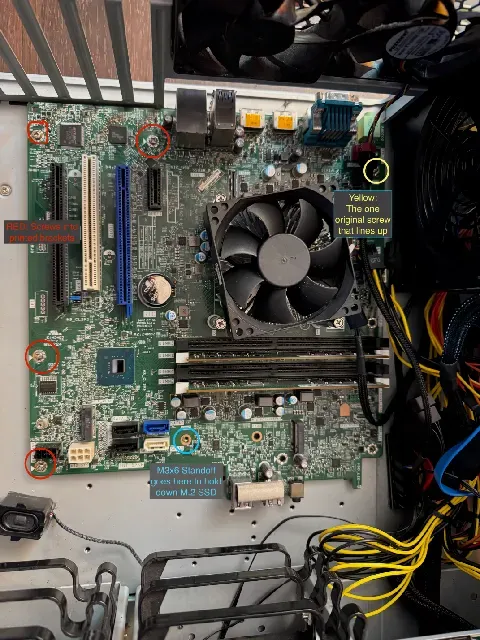
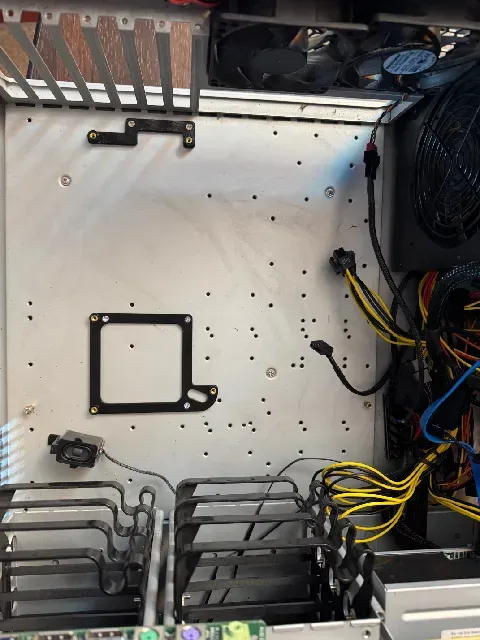
I'll start by saying I sincerely hope no other human being ever finds themselves building such a cursed PC. But if you're stuck in the same boat, at least I've got a tea cup to help bail you out.
The motherboards in most Dell PC's don't use standard mounting patterns or power plugs. I've been using a Dell Optiplex 7060 as my obligatory Windows machine (I'm a Mac / Linux user), mostly to play Talos Principle 2 which needed quite a bit more video card than the on-board GPU. For a while the RTX 3060 I crammed into the Dell case was working, but I think the seriously under-powered power supply finally said “enough”. Also, for unfathomable reasons, the only PCIe port accessible for a double-wide card in the Optiplex was only wired for x4. The x16 slot didn't leave any room with the original PSU right next to the motherboard.
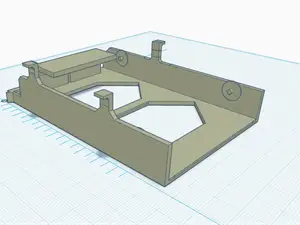
I had (almost) everything I needed on the spare parts shelf to replace the PSU, but nothing fit. With some measuring and trial and error, I made these two adapters. These plus the ONE screw that actually lined up on the original board let me get a total of six screws holding down the mother board. Stuffing everything in to an insanely oversized rack mount case left plenty of room for the RTX as well as some added cooling.
BOM:
- 5x M3x5 heatsets (IE “Voron standard”) - 5x #6 flat head screws (or whatever your existing case takes) Must be flat with no protruding head or your risk shorting the motherboard - 1x M3x6 standoff for SSD - 4x M3x6-8mm screws, ideally with large pan heads - 1x #6 standard ATX motherboard standoff - 1x #6 pan head “computer screw” Additionally, you'll need an ATX to “Dell” adapter for the power supply. My 7060 had Dell's 6-pin power plug, so this thing worked, but there are some that use a different 8-pin adapter. The adapter itself looks like it's just a passive connection except for the PS-on pin tied to ground, so you could probably make an adapter if you wanted to cut some plugs off…
I printed in PLA figuring if the bottom side of the motherboard is over 60ºC, I've got bigger problems, but PETG or ABS wouldn't hurt.
Insert the heatsets into the standoff portions of the two brackets. Screw the brackets down to the case with the #6 flat head screws.
Make sure you have one standard case standoff in the corner nearest the power supply.
Screw the motherboard down to four of the bracket positions with M3 screws.
The bracket position that's under where the M.2 SSD sits should get the M3x6 standoff instead. Then you can install the SSD and screw it into the standoff.
The corner near the PSU gets “normal” standoff plus screw treatment the same as any non-garbage motherboard would use.
Enjoy your new trash rig!




Names are used only to indicate the source of a result. Polyzon is not affiliated with the listed sites.