
Free 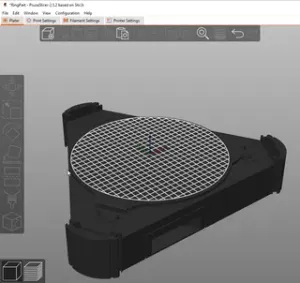
FLSun SR PrusaSlicer Profile
Printables


This Projet is WORK IN PROGRESS
If you like this project, take a moment to buy me a virtual coffee …
To install the texture and printer silhoutte in PrusaSlicer, go to:
Settings → Printer Settings → General → Bed shape → “Set…”
Load the SVG file ( V400.svg ) as the texture , Load the STL file ( V400_bed.stl ) as the Model .
Then Save the Profile Modified.
To know more about custom SVG and PNG bed textures , have a look at the Prusa knowledge base: https://help.prusa3d.com/article/custom-svg-and-png-bed-textures_124612
Pritables group link:
https://www.printables.com/it/group/fl-sun-v400-italia-oQJxNoR/comments
Starter G-code:
;STARTGCODE M117 Initializing ; Set coordinate modes G90 ; use absolute coordinates M83 ; extruder relative mode ; Reset speed and extrusion rates M200 D0 ; disable volumetric E M220 S100 ; reset speed ; Set initial warmup temps M117 Nozzle preheat M104 S100 ; preheat extruder to no ooze temp M140 S[first_layer_bed_temperature] ; set bed temp M190 S[first_layer_bed_temperature] ; wait for bed final temp M300 S40 P10 ; Bip ; Home M117 Homing G28 ; home all with default mesh bed level ; For ABL users put G29 for a leveling request ; Final warmup routine M117 Final warmup M104 S[first_layer_temperature] ; set extruder final temp M109 S[first_layer_temperature] ; wait for extruder final temp M190 S[first_layer_bed_temperature] ; wait for bed final temp M300 S440 P200 ; 1st beep for printer ready and allow some time to clean nozzle M300 S0 P250 ; wait between dual beep M300 S440 P200 ; 2nd beep for printer ready G4 S10 ; wait to clean the nozzle M300 S440 P200 ; 3rd beep for ready to start printing ; Prime line routine M117 Printing prime line ;M900 K0; Disable Linear Advance (Marlin) for prime line G92 E0.0; reset extrusion distance G1 F3000 Z1 G1 X-150 Y0 Z0.4 G92 E0 G3 X0 Y-130 I150 Z0.3 E30 F2000 G92 E0.0 ; reset extrusion distance ; Final print adjustments M117 Preparing to print ;M82 ; extruder absolute mode M221 S{if layer_height<0.075}100{else}95{endif} M300 S40 P10 ; chirp M117 Print [input_filename]; Display: Printing started... Final G-code
; printing object ENDGCODE G92 E0.0 ; prepare to retract G1 E-6 F3000; retract to avoid stringing ; Anti-stringing end wiggle {if layer_z < max_print_height}G1 Z{min(layer_z+100, max_print_height)}{endif} F4000 ; Move print head up G1 X0 Y120 F3000 ; present print ; Reset print setting overrides G92 E0 M200 D0 ; disable volumetric e M220 S100 ; reset speed factor to 100% M221 S100 ; reset extruder factor to 100% ;M900 K0 ; reset linear acceleration(Marlin) ; Shut down printer G28; M104 S0 ; turn off temperature M140 S0 ; turn off heatbed M107 ; turn off fan M18 S180 ;disable motors after 180s M300 S40 P10 ; Bip M117 Print finish. Before Layer Change G-code
;BEFORE_LAYER_CHANGE G92 E0.0 ;[layer_z] After Layer Change G-code
;AFTER_LAYER_CHANGE ;[layer_z] Follow us and contact us for other requests:




Names are used only to indicate the source of a result. Polyzon is not affiliated with the listed sites.