
Free 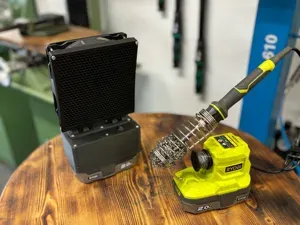
Soldering Fume Extractor Ryobi
MakerWorld


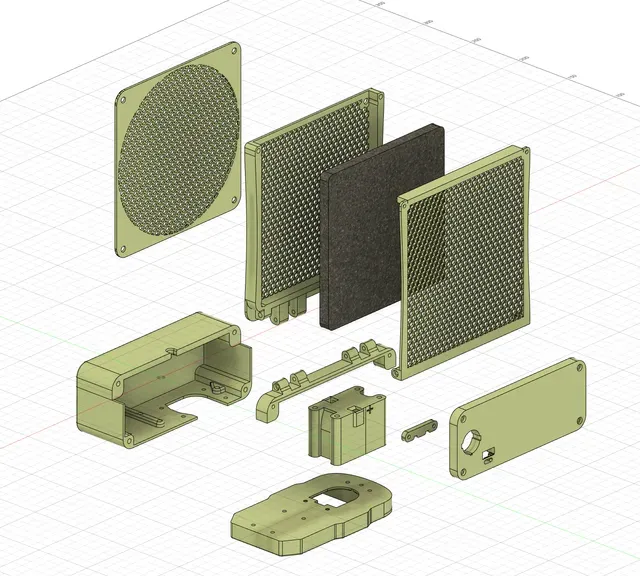
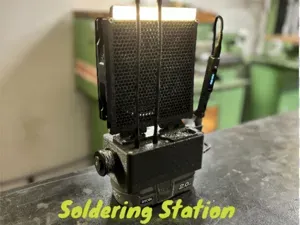
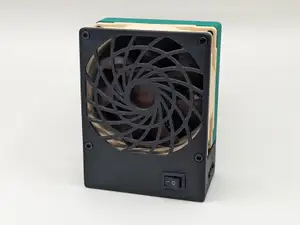
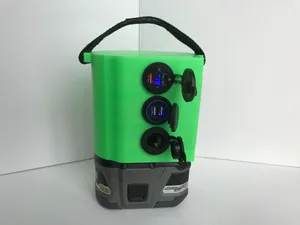
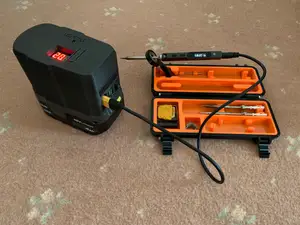
Building off the ideas seen in other solder fume extractors, this is my version of the Solder Fume Extractor, attempting to bring the best in portability for soldering:
- fume mitigation with the widely-available Weller WSA350F Carbon Filter - USB PD to power soldering irons such as the TS80P / TS101 / Pinecil - cordless and rechargeable power supply using the widely-available Ryobi ONE+ 18v battery packs - voltage conversion to power a typical 140mm PC fan - the Ryobi battery serves double-duty, providing a stabilizing mass as the base of the fan - a large hinge allows for tilting the fan for optimal positioning - the filter enclosure is able to be easily opened, allowing for easy replacement of the carbon filter when needed - a hexagon grid pattern is used for style and functionality as the mesh pattern, the small hexagons are intended to keep tiny fingers safe
Materials needed:
Qty Part Recommended Part
~200g PLA Filament Prusament PLA
1 140mm computer fan (12V) Noctua NF-A14
1 Round SPST toggle switch KCD1-X-Y Rocker Switch
1 Carbon filter Weller WSA350F
2 Cell Leaf Spring Keystone 209
1 USB Type C PD Adapter ACEIRMC 60W PD 3.0 Adapter
1 DC-DC Buck Converter for stepping down the 20V power to 12V LM2596 DC-DC Buck Converter
1 Ryobi ONE+ 18V battery ONE+ 18V High Performance Starter Kit
~2 ft Wire 14 ga two conductor silicone
19 M3x3 heat set insert CNC Kitchen Threaded Insert
8 M5x10 self-tapping screws – 8 total are needed, and 4 of these are included with the Noctua NF-A14. Computer Case Fan Screws (50 pack)
2 M3x8mm M3 Assortment
2 M3x10mm
2 M3x15mm
13 M3x20mm
4 M3x40mm
2 M3x50mm
2 M3 lock nut uxcell nylock hex nuts
Optional Materials/Tools
Part Recommended Part
Heat shrink tubing Wirefly Heat Shrink 3:1 kit
XT30 Connectors 10 Pairs XT30 Connectors
Pick set CHANNELLOCK HP-4ECP 4pc Hook & Pick Set
Heat Gun Wagner Furno 750
Printing:
Each component has been designed with an ideal print surface in mind, and these components are positioned appropriately in each of the 3mf files.
No print supports are needed except for the Ryobi Mount. The larger piece should be printed with supports enabled. The supports are needed for clip interface with the Ryobi battery and can be removed using a 90° pick .
PLA should be fine. I designed and tested each of the parts at 0.15mm layer height using a 0.4mm nozzle.
Assembly
Preparation
Set the heat-set inserts into the models as follows:
- The Ryobi battery mount needs 4 placed into the bottom face of the upper component. - The Filter Housing Bottom Grid uses 4: 2 in the top and 2 in the bottom outer sides. These are used to secure the Filter Housing Outer. and allow for swapping the carbon filter. - The Control Panel uses 2 inserts, 1 on each side of the mounting positions for the USB PD board. - The Electronics Enclosure uses 9 inserts: 4 in the front, used to attach the Control Panel, and 5 on the bottom for Ryobi Mount. Electronics Assemblies
Using the above diagram as a guide, solder and finish the wiring using heat shrink tubing and XT30 connectors as needed.
When using the XT30 connectors, pay attention to the polarity. Note that the flat side is marked “+” to indicate the positive side.
Do not connect the fan yet. The buck converter needs to first be calibrated to the correct output voltage.
To prepare the fan connection, cut off the fan connector, leaving most of the fan wire intact. Then strip the black fan wire (GND) and the yellow wire (+12V). If you are using a fan with a 3-pin connector, check the documentation for the fan to verify which wire is +12V vs GND. Noctua provides a diagram for the pinouts .




Names are used only to indicate the source of a result. Polyzon is not affiliated with the listed sites.