
Free 
Ender 3 v2 Dial Gauge Mount Remix
Thingiverse


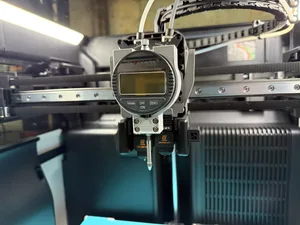
I'm sharing my own Dial Indicator extruder mount for the Creality Ender 3 V2. It should work for most common Dial Indicators. You can place the Dial Indicator at various heights and then tighten it securely in place. Because the mount allows height adjustability you may match the dead bottom of your Dial Indicator to match the nozzle height if you wish. The Dial Indicator needle is placed precisely in front of the Nozzle (Y axis).
The Dial Indicator mount can be used along with the BL Touch mounted on the extruder. My approach to designing this was to make the indicator holder simple to put on and remove from the extruder, it simply slides on and off the extruder. (I added a small 0.1mm offset on the inside surfaces of the mount, so it can easily be placed on the extruder., however, depending on your print settings, extrusion multiplier etc. if there is a bit of play you can simply add a layer of masking tape on the inside of the holder to ensure a tight fit.)
In order to secure the dial indicator to the holder you need one M5x20 bolt (or longer) and one M5 nut.
Using a Dial Indicator allows you to manually level your bed to high accuracy. No paper involved.




Names are used only to indicate the source of a result. Polyzon is not affiliated with the listed sites.
Comments