
Free 
USB-C Dock for most Laptops
Printables


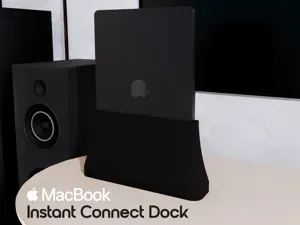
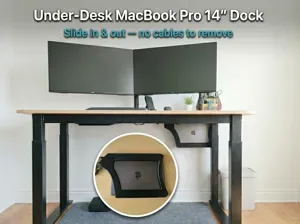
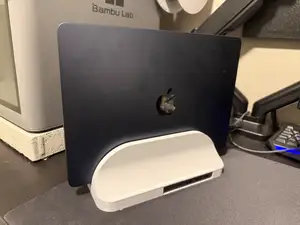
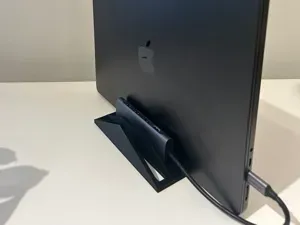
Tired of searching for USB-C Docks for your specific laptop model or you simply want to use your case? Well i got you covered. The adjustable Dock provides a nice seat for your laptop, or the laptop after, and after… well you get it. The dock is adjustable, from the thickness of the laptop, over to the height of the usb-c port. Additionally the foot is easily replaceable for another height to provide an insert-angle you feel comfortable with. You can also hide cables or small adapters within the foot of course if you have a hole in your desk for better cable management.
<iframe width="560" height="315" src="https://www.youtube.com/embed/1tprUtdc4g8?si=6SEfSI0BdKFuESxY" title="YouTube video player" frameborder="0" allow="accelerometer; autoplay; clipboard-write; encrypted-media; gyroscope; picture-in-picture; web-share" referrerpolicy="strict-origin-when-cross-origin" allowfullscreen></iframe>
Further Infos: This dock version is made for 13/14 inch laptops, however bigger ones might fit, but at a higher angle to prevent the dock to fall over. Supported laptops can have a maximum width of 20mm. The usb-C port can be placed on maximum height of 60mm from the back of the laptop to the start of the USB-C port. Feel free to contact me if i need to support further laptop models in my next version.
Additional Material: 1x USB-C Female to Male Adapter (https://amzn.eu/d/gVqFb1i) 1x Antiscratch-material (https://amzn.eu/d/3CaoQSZ) but you can take another, since the width is adjustable.
Printing: Printed with PLA , however PETG might be better (due to laptop heat) I recommend Infill to be over 10% at least and 0.2 layer height. No supports needed, just print in auto-orientation of your slicer.
What to print: 1x Base 1x Foot 1x wall left 1x wall right 4x wall screws 1x usb-c holder 1x usb-c holder screw OPTIONAL stencil for cutting the antiscratch-material
Assembly: use the inside of the stencil to first draw, then cut the right sizes for your anti-scratch material. Also cut a small stripe for the lower ends of each wall, as well as a 1cm thick stripe for the middle bottom of the dock insert the USB-C adapter into the casing, and put it into the rail mount the nut for the adapter, but do not yet screw it in hardly Insert the walls and the wall nuts from beneath, again gentle screwing them in, not securing yet Now take your laptop and insert it so that the usb-c is connected and the laptop is flat in the dock. secure the usb-c nut now push the wall nuts as far as you can towards the middle and secure them with just a bit of force when using a screwdriver. Now slide on the foot and you are ready to go!!
I recommend to add some strips of anti slip material or double sided tape on the foot, so the dock does not move while connecting the device.
I would love to here from you if you like the model, since its my first, and what could be improved. Thanks and have fun :)
Buy me a coffee: paypal.me/time2snipez



Names are used only to indicate the source of a result. Polyzon is not affiliated with the listed sites.
Comments 0
Loading comments…