%2Fhttps%3A%2F%2Ffbi.cults3d.com%2Fuploaders%2F13845051%2Fillustration-file%2F91ce9ead-ada0-49a0-98d4-916653598d2f%2Fgif.gif&w=640)
Gratis 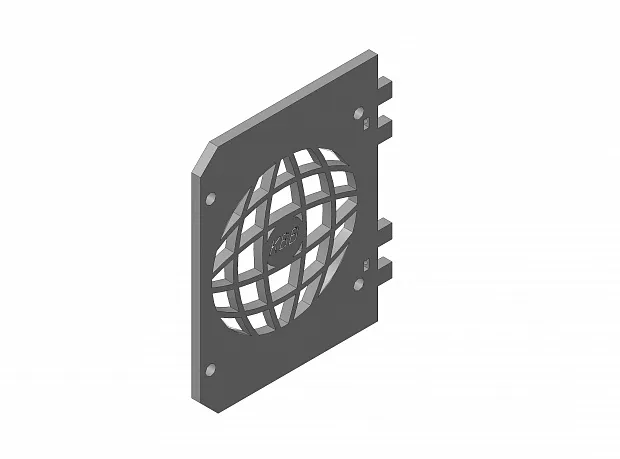
Установка вентилятора D90 для обдува мат. платы anet A6
3DToday
This collection gathers 3D models built around motherboards: mounts and standoffs, fan covers, open test benches, rack panels and small enclosures. Most of them solve a practical problem — holding a board in place, routing airflow, or fitting a compact board into a rack or case. It is useful for 3D printing when a ready-made part does not match your board size or the space you have. Polyzon does not confirm whether models are free, their price, license, official status, affiliation, safety or fitness. Check the current terms at the source.
Il testo di questa raccolta è in inglese; la ricerca funziona in qualsiasi lingua.
 Una raccolta di Polyzon · 48 modelli da 6 siti
Polyzon compone questa raccolta a partire dai risultati di ricerca dei siti collegati. I doppioni e i modelli senza anteprima vengono rimossi, le corrispondenze deboli finiscono in fondo e il resto mantiene l’ordine dei risultati. I modelli appartengono ai rispettivi autori: verifica le condizioni sulla pagina di ciascun modello.
Criteri di selezione a cura della redazione di Polyzon · Testo aggiornato: 11/10/2026
%2Fhttps%3A%2F%2Ffbi.cults3d.com%2Fuploaders%2F13845051%2Fillustration-file%2F91ce9ead-ada0-49a0-98d4-916653598d2f%2Fgif.gif&w=300)






%2Fhttps%3A%2F%2Ffbi.cults3d.com%2Fuploaders%2F7965781%2Fillustration-file%2Fe3d2dddd-8a5c-4f91-b54e-3dd5bfe2e83d%2Fc2c5fe9fb076a940662f8397b8487e16_preview_featured.jpg&w=300)





%2Fhttps%3A%2F%2Ffbi.cults3d.com%2Fuploaders%2F15397850%2Fillustration-file%2F27af20af-fa5c-4a74-b4b1-0bad95db55b3%2FMaria_Christ_KEY.jpg&w=300)
%2Fhttps%3A%2F%2Ffbi.cults3d.com%2Fuploaders%2F13712878%2Fillustration-file%2F4dab71da-bc4a-40d1-b696-9f4f80d13a09%2F1836_353340_display_large.jpg&w=300)

%2Fhttps%3A%2F%2Ffbi.cults3d.com%2Fuploaders%2F12952380%2Fillustration-file%2F014be792-2377-4ee7-8620-90288e0e8dbe%2Funtitled.114.jpg&w=300)



%2Fhttps%3A%2F%2Ffbi.cults3d.com%2Fuploaders%2F15606469%2Fillustration-file%2F360f6406-58c8-4767-bdff-8ac1cb582e2d%2FMATE%2520BOB%2520ESPONJA.jpg&w=300)


%2Fhttps%3A%2F%2Ffbi.cults3d.com%2Fuploaders%2F15606469%2Fillustration-file%2F2fc11b53-7835-4d10-87a1-d8b716b8cb17%2Fcasco%2520senna%25201.jpg&w=300)


%2Fhttps%3A%2F%2Ffbi.cults3d.com%2Fuploaders%2F13080663%2Fillustration-file%2F10d176a3-de3b-4e55-a93e-cc632df6f69f%2F20180102_185227.png&w=300)

%2Fhttps%3A%2F%2Ffbi.cults3d.com%2Fuploaders%2F16584667%2Fillustration-file%2F032ea21e-ddae-4b70-a6a2-9f6f360b879c%2FScreenshot_2.jpg&w=300)

%2Fhttps%3A%2F%2Ffbi.cults3d.com%2Fuploaders%2F13712493%2Fillustration-file%2F88d20cf7-4de6-4cc2-a357-1633138ee3d8%2Fmate%2520mama%2520foto.jpg&w=300)
%2Fhttps%3A%2F%2Ffbi.cults3d.com%2Fuploaders%2F14087676%2Fillustration-file%2F7e8f6c12-8e7b-44da-8d42-5e85234f16d9%2F1_6.png&w=300)

%2Fhttps%3A%2F%2Ffbi.cults3d.com%2Fuploaders%2F14399205%2Fillustration-file%2F9e36af3b-3c92-4436-9d93-10b9f556adfc%2Fezgif.com-optimize%2520(1).gif&w=300)
%2Fhttps%3A%2F%2Ffbi.cults3d.com%2Fuploaders%2F13540074%2Fillustration-file%2F4583e6ba-0ffc-4151-9280-4337fcd18304%2FFeliz%2520dia%2520mama%252002.png&w=300)


The models fall into a few groups that differ in what they hold and how they load. Mounts and standoffs fix a board to a surface or to another part, covers and fan mounts sit over a board inside a printer or a case, test benches and open frames carry a board plus a power supply without a full enclosure, and rack panels or small chassis adapt mini-ITX and similar boards to standard rack widths. Some parts are flat plates with holes; others are brackets, ducts or boxes with several pieces to assemble.
When choosing, check the board form factor and hole spacing the author lists, the screw size and thread the model expects, and whether the part leaves room for connectors, RAM and coolers. For covers and ducts, look at the fan size and the clearance above the board, and remember that heat and airflow matter more in a closed space. Material choice follows the load: a standoff or a bench bracket carries weight, while a cover is mostly a shell. Photos of real prints on the model page show how the part fits in practice.
To narrow the results, try synonyms and related terms: mainboard or mobo instead of motherboard, standoff or spacer instead of mount, open frame or test bench instead of case, and rack panel or rack shelf for rack builds. Adding a board size such as mini-ITX, mATX or ATX, or a component such as PSU, fan or PCIe, filters the list further. If you need a part for a specific printer, search by the printer series together with cover or fan mount.

%2Fhttps%3A%2F%2Ffbi.cults3d.com%2Fuploaders%2F14478223%2Fillustration-file%2F3652441d-3432-4546-8088-18520f67759d%2FIMG_7956.JPG&w=300)
%2Fhttps%3A%2F%2Ffbi.cults3d.com%2Fuploaders%2F15441106%2Fillustration-file%2F765c2d1b-4eb4-4cfd-b445-09a850c7ef6d%2F120135707_666929650607361_3941884113350798408_n.jpg&w=300)

Il catalogo completo dei temi, dalla casa alla lavorazione CNC, con ricerca su tutti i siti collegati.