
Бесплатно 
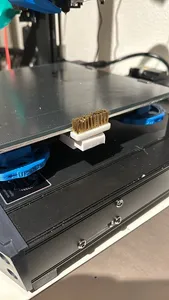
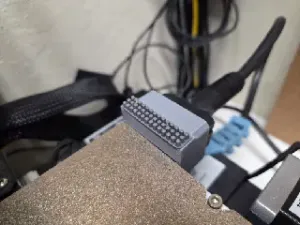
Right side silicone nozzle brush holder for Ender 3 S1 Pro
Printables


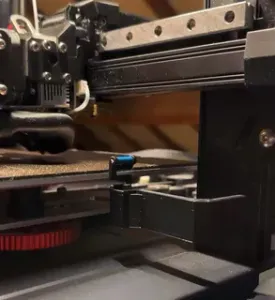
Silicone brush holder attached to lower part of the heat bed. Mod compatible with Sonicpad/general klipper.
How to mount: 1. unscrew front left leveling nut 2. slide the bed mount 3. slide the brush mount to the bed mount and adjust the position. 4. (recommended) use cyanacrylate glue to secure the position of brush mount (DO NOT glue the bed mount to the heat bed). 5. Screw front left leveling nut again. 6. level your bed as usual.
I strongly recommend adjusting the brush mount as close to the bed as possible to avoid crash with gantry. The macro allows you to clean the nozzle even if you do not print.
################## You need to edit your start gcode and printer.cfg. You'll also need to modify Z height to your preferences.
paste that macro into your printer.cfg
[gcode_macro CLEAN_NOZZLE] description: "nozzle cleaning"
gcode:
# Check if homing is required {% if printer.toolhead.homed_axes != "xyz" %} {% endif %}
# Check current nozzle temperature M105 {% if printer.extruder.temperature < 170 %} M117 Heating nozzle to 170°C... M109 S170 ; Set nozzle temperature and wait {% endif %}
G91 ; Relative positioning mode G1 Z10 F3000 ; Lift nozzle to a safe height G90 ; Absolute positioning mode
# First cleaning sequence (X=-7.6) G1 X-7.6 Y-7 F7800 ; Move to initial position G1 Z1.5 F600 ; Lower to cleaning height G1 Y50 F7800 G1 Y-7 F7800 G1 Y50 F7800 G1 Y-7 F7800 G1 Y50 F7800
# Second cleaning sequence (X=-6) G1 X-6 F7800 ; Move to new position G1 Y50 F7800 G1 Y-7 F7800 G1 Y50 F7800 G1 Y-7 F7800 G1 Y50 F7800
# Third cleaning sequence (return to X=-7.6) G1 X-7.6 F7800 ; Return to original position G1 Y50 F7800 G1 Y-7 F7800 G1 Y50 F7800 G1 Y-7 F7800 G1 Y50 F7800
G1 Z10 F3000 ; Lift nozzle after cleaning M117 Cleaning completed ; Display message on Sonic Pad screen
paste “CLEAN_NOZZLE” before your prime line.
Here's mine start gcode:
G90 G92 E0 ; Extruder reset G28 ; Home all axes BED_MESH_CALIBRATE ; Leveling CLEAN_NOZZLE ; nozzle cleaning G1 Z2.0 F3000 G1 X20 Y0.7 Z0.3 F5000.0 G1 X200.0 Y0.7 Z0.3 F1500.0 E15 G1 X200.0 Y1 Z0.3 F5000.0 G1 X20 Y1 Z0.3 F1500.0 E30 G92 E0 G1 Z2.0 F3000 G1 X20 Y1 Z0.3 F5000.0 Of course TEST EVERYTHING BEFORE USING, adjust Z height of nozzle cleaning. Note that my prime line goes along X axis, not Y axis.






Названия используются только для указания источника результата. Polyzon не аффилирован с перечисленными площадками.