
Бесплатно ![Airbus A320 FCU Panel [Multi-Colored Version]](https://cache.polyzon.org/api/img?url=https%3A%2F%2Fmedia.printables.com%2Fmedia%2Fprints%2F593f00c0-3341-493d-8912-13753b25a9c7%2Fimages%2F10386328_3156a600-e933-49bc-86ba-a0dd67c6a0ba_1f09afc6-4763-4888-8223-adef2815539a%2Fpxl_20250716_122757329.jpg&w=300)
Airbus A320 FCU Panel [Multi-Colored Version]
Printables
![Airbus A320 EFIS Panel [Multi-Colored Version]](https://cache.polyzon.org/api/img?url=https%3A%2F%2Fmedia.printables.com%2Fmedia%2Fprints%2F96237181-b9df-4505-8aa7-a3d984d6d6bc%2Fimages%2F9796180_292e5a01-926a-4ef7-9d51-bd448f8f64c6_edae177b-df5f-4b71-8ef3-91eb80313b90%2Fpxl_20250518_121701052.jpg&w=640)
![Airbus A320 EFIS Panel [Multi-Colored Version] — Фото 2 из 7](https://cache.polyzon.org/api/img?url=https%3A%2F%2Fmedia.printables.com%2Fmedia%2Fprints%2F5242a8ed-fdc1-40ae-9050-da32f03680db%2Fimages%2F9796193_c6553955-f0ad-4fa0-ba2e-ba7e7b27d449_0824b40f-cb07-4983-aa1e-3dd78c4c988c%2Fpxl_20250518_120512070.jpg&w=640)
![Airbus A320 EFIS Panel [Multi-Colored Version] — Фото 3 из 7](https://cache.polyzon.org/api/img?url=https%3A%2F%2Fmedia.printables.com%2Fmedia%2Fprints%2F0749b340-92aa-4962-878e-399745292197%2Fimages%2F9796194_d39a8fff-7ec5-4421-86f6-4b4f60fcf0d1_b545730d-c255-440d-b872-7ee3aa5391ac%2Fpxl_20250518_120442061.jpg&w=640)
![Airbus A320 EFIS Panel [Multi-Colored Version] — Фото 4 из 7](https://cache.polyzon.org/api/img?url=https%3A%2F%2Fmedia.printables.com%2Fmedia%2Fprints%2F9474b7d3-8f88-4274-83f8-1ebb35024922%2Fimages%2F9796195_cd9a4ecf-9e68-4665-96e7-f4e763e4584a_4a8bc2b5-8b69-4210-ab49-5e50410aa878%2Fpxl_20250518_120420734.jpg&w=640)
![Airbus A320 EFIS Panel [Multi-Colored Version] — Фото 5 из 7](https://cache.polyzon.org/api/img?url=https%3A%2F%2Fmedia.printables.com%2Fmedia%2Fprints%2Fb422185d-97ba-42d3-873c-64fcd283386f%2Fimages%2F9796196_4faee202-c9bc-4084-862d-6c13179b15fc_57206531-b4cd-4a84-bc7b-738ad75757a5%2Fpxl_20250518_120450551.jpg&w=640)
![Airbus A320 EFIS Panel [Multi-Colored Version] — Фото 6 из 7](https://cache.polyzon.org/api/img?url=https%3A%2F%2Fmedia.printables.com%2Fmedia%2Fprints%2F3a28a330-e248-4528-83ab-cc3483e1104b%2Fimages%2F9796197_afe216ea-9dcd-428b-b090-03aa43dac4dc_f9628fea-a5d4-425f-a5af-29a36cdd28ec%2Fpxl_20250518_121637823.jpg&w=640)
![Airbus A320 EFIS Panel [Multi-Colored Version] — Фото 7 из 7](https://cache.polyzon.org/api/img?url=https%3A%2F%2Fmedia.printables.com%2Fmedia%2Fprints%2F70bc4f87-ad76-4b05-bc79-c05ce12595bf%2Fimages%2F9796198_4c78e705-daaa-4388-8858-bec72db7692f_e8648bb4-4f0a-49a8-9ec2-8f7786f45f60%2Fpxl_20250518_120430552.jpg&w=640)
Update 2025-08/05 - Added my Mobiflight preset and a section in the end explaining it
This is still a work in progress!
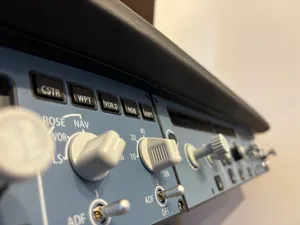
A modified Version of Mark Aytons A320 EFIS Panels.
The front Panel is printed with a 0.2 mm nozzle on my bambulab x1c and the file is a 3mf file with multiple objects. When importing in OrcaSlicer or BambuStudio press no to scale to millimeters and yes to load as a single object with multiple parts. Then in the objects list right-click and change the filament colors for the top layer of text objects to white and the bottom layer of text to a transparent filament.
I also had Ironing on top layer turned on which gave me a really nice finish. If you're printing my FCU model too make sure to put it in the right otientation on the plate so the ironing lines match up.
The rest of the parts were printed wit a standard .4mm nozzle and .2mm layer height. All parts except the transparent objects had 100% infill.
The bottom Panel has holes for some 3mm flat top warm white leds that i glued in with hot glue. They shine right through the middle panel and into the top panel.
Be sure to check out my FCU Panel and 3d printable Korry Buttons ;).
A link for the transparent pla that I used: https://www.3dprima.com/se/filament-resin/filament/pla/others/polymaker-panchroma-pla-translucent_31803_15852
3mm flat top warm white LED: https://www.aliexpress.com/item/1005007536927963.html?spm=a2g0o.productlist.main.1.6257U9nDU9nDid&algo_pvid=01b84067-2369-491c-a8d5-458214d6c05c&algo_exp_id=01b84067-2369-491c-a8d5-458214d6c05c-0&pdp_ext_f=%7B%22order%22%3A%2253%22%2C%22eval%22%3A%221%22%7D&pdp_npi=4%40dis%21SEK%2148.79%219.87%21%21%2135.23%217.12%21%40210384cc17475696295493007e1c85%2112000041204892453%21sea%21SE%210%21ABX&curPageLogUid=9LVI2TGXM8pq&utparam-url=scene%3Asearch%7Cquery_from%3A
Software, Mobiflight
For the software I used a program called Mobiflight. It basically connects to your simulator and sends a command every time a button is clicked. I've added my own preset in the files page that works with the Fly By Wire A32NX and I will describe everything shortly here:
You first have to start by flashing the arduino with the Mobiflight software and specifiyng the inputs and outputs to the physical pin. Click on “Mobiflight Modules” and you should see your arduuino and be able to flash it with the correct inputs.
Important , when flashing the FCU or EFIS arduino be sure to flash with Kav's firmware and not the default Arduino Mega firmware.
Inputs
All the inputs are fairly staraightforward, every physical button is bound to an MSFS input. The file is separated into FCU, RMP and WINWING sections. The winwing input is just my personal input which you can delete.
Outputs
The outputs on the other hand are a bit more complex since for example everything is turned off when the battery amd external power is disconnected from the aircraft, the RMP switch works and the annunciator test switch works. But the core is the same, every LED and display is connected to an output. Beyond that there are some more lines that tell the lights to turn off or on dending on the aircrafts state. Most outputs also have a defined “precondition” which basically is an “if” statement. If the precondition is false the line won't execute.

![Airbus A320 Radio Managment Panel [RMP]](https://cache.polyzon.org/api/img?url=https%3A%2F%2Fmedia.printables.com%2Fmedia%2Fprints%2Fa117664b-7482-4625-be91-3d46168b3742%2Fimages%2F13292151_2c46eb8c-ab43-4f15-940e-1a94dd370236_f265bffd-c527-497f-ab0c-8039644b6915%2Frmp_guide_1-1.png&w=300)

Названия используются только для указания источника результата. Polyzon не аффилирован с перечисленными площадками.