
Бесплатно 
BE LAZY RPi Pico 2 modular electronics enclosure / case / box
Printables
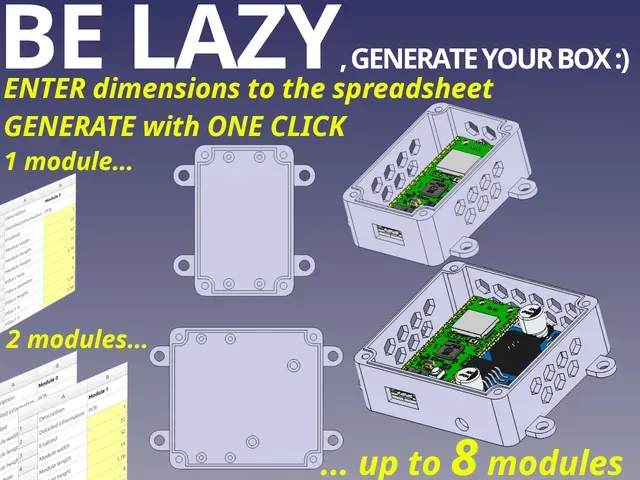
Overview
No CAD skills required! Everything is handled via easy-to-use spreadsheets. Smart modularity:
- up to 8 user defined modules, where each module can have fully parametric:
- up to 4 pillars for PCB mounting
- one rectangular hole on the panel
- one circular hole on the panel
All-in-one solution:
- mounting screws - thread, head diameter
- mounting pads - amount, pitches, holes dimensions
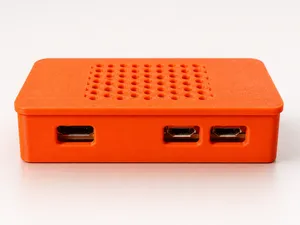
- honeycomb pattern for cooling - enable/disable, diameter, pitch
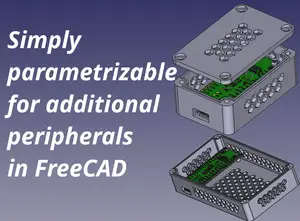
Designed in FreeCAD 1.1.0 , source files included.
Use the comments section for any questions, issues, or suggestions :) Share your modules, post your prints, create a remix! Before creating a remix by modifying the model itself (rather than just changing the spreadsheets), please refer to the following section: https://www.printables.com/model/1602115-be-lazy-modular-electronics-enclosure-case-box-par#quality-remix-howto
Modularity concept
You can configure up to 8 modules. The module meas e.g. mounting area for PCB, hole for connector on the panel, free space with defined dimension etc.
Each module has fixed position (see below), but the dimension of the case is dynamically recalculated.
Each module has own coordinate system, which is shifter according to the module number.
Each module is aligned to the panel (enclosure wall) and also to other modules, see below.
Module configuration concept
Each module has own "space" inside the enclosure. This space is defined by width/length/height. Inside this space, you are allowed to define:
- up to 4 pillars by setting dimension (diameter, hole, height) and position (x,y)
- one rectangular hole by setting 2 point for rectangular corners
- one circular hole by setting center of the circle and diameter
!!! NECESSARY CONFIGURATION OF FREECAD !!!
When you enter any parameter into the spreadsheet, FreeCAD automatically recompute whole model. It can take a time. During setting the parameters, TURN OFF AUTOMATIC RECOMPUTE by right click on the model (see 1 below) and check SKIP RECOMPUTE checkbox.
Click REFRESH button (2) when you are finished with parametrization to recompute the model, be pacient the recompute time can be in minutes .
Model parametrization
Module parametrization
- There is a dedicated sheet for each module (Module0 to Module7). Please select the sheet corresponding to your module number.
- Enable you module - set Enabled=1. OPTIONAL: Set Description and Detailed Information
- Define module and pillars dimensions.
ATTENTION: There is no spacing defined between the modules. Consider to add "border" of eg. 0.5mm arround your PCB. Of course, change pillars X,Y coordinates accordingly.
- Set X,Y coordinates for pillar1..pillar4. If any pillar will not be used, set X,Y coordinates to 0.
ATTENTION: Each pillar shall be "inside" module area completely, otherwise will not be generated.
- Set X,Z coordinates for rectangular or circular hole on the panel. If any hole will not be used, set X,Z coordinates to 0. When at least one holes is defined, the honeycomb pattern shall be disabled for the module.
NOTE: If no hole is defined and you need to disable honeycomb pattern for the module, set Panel1 fill = 1 .
ATTENTION: Holes shall be "inside" module area completely, otherwise will not be generated.
- Go to step 1 and define next module :) DO NOT FORGET TO RECOMPUTE MODEL !!!
Box thickness parametrization
- Open spreadsheet dimensions in Freecad
- Change thickness.



Названия используются только для указания источника результата. Polyzon не аффилирован с перечисленными площадками.