
Бесплатно 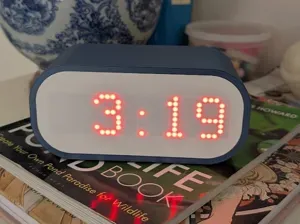
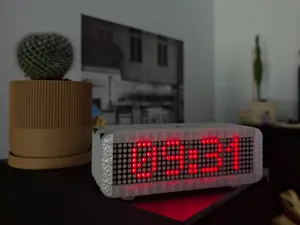
Clock with Matrix Display
MakerWorld


This clock requires no soldering and only a few parts (AliExpress links provided):
- ESP32-C3 Supermini
- MAX7219 Dot Matrix Module
- 4 Female-Female Dupont wires
You can optionally use M3 OD 4.2mm heatset inserts and M3x8mm bolts to connect the back to body.
If you'd rather not use heatsets+bolts, you can instead assemble the back and body as one part in the slicer. It'll be hard to dissemble later, but if you're not going to take it apart, printing the back and body as one piece works great.
To assemble:
- Install the ESP32-C3 Supermini into the back, pins up. It fits in the mount in the back tightly. It doesn't need any glue to stay in place.
- Connect the Dupont wires to the ESP32-C3 Supermini.
- Install the MAX7219 into the diffuser. It snaps into place and should stay without glue; however, if it's a bit lose, a few dots of superglue will ensure it stays in place.
- Connect the dupont wires to the MAX7219.
- Install the diffuser into the body. The pins will need to be bent so the diffuser fits into the body. The diffuser will fit tightly; if it's a little loose, a few dots of superglue can be used to hold it in place.
- If the back and body were printed separately, install the heatset inserts and secure the back to the body.
The ESP32-C3 - MAX7219 pins are:
- CLK to GPIO7
- MOSI/DIN to GPIO5
- CS to GPIO6
- 5V to power
- GND to ground
The ESPHome configuration YAML:
esphome: name: "clock"
esp32: board: esp32-c3-devkitm-1 framework: type: esp-idf
logger:
api: encryption: key: "PUT KEY HERE"
ota: - platform: esphome password: "PUT PASSWORD HERE"
wifi: ssid: !secret wifi_ssid password: !secret wifi_password id: wifi_connection output_power: 8.5dB
time: - platform: homeassistant id: homeassistant_time
button: - platform: restart id: reboot icon: mdi:power-cycle name: "ESP Reboot"
sensor: - platform: internal_temperature name: ESP Temperature unit_of_measurement: °C device_class: TEMPERATURE update_interval: 30s entity_category: "diagnostic" disabled_by_default: True - platform: uptime name: Uptime id: sys_uptime update_interval: 10s disabled_by_default: True - platform: wifi_signal name: WiFi RSSI id: wifi_signal_db update_interval: 30s entity_category: "diagnostic" disabled_by_default: True
spi: clk_pin: GPIO7 mosi_pin: GPIO5
font: - file: "https://raw.githubusercontent.com/fcambus/spleen/refs/heads/master/spleen-6x12.bdf" id: time_only_font glyphs: '0123456789:' - file: "https://github.com/trip5/Matrix-Fonts/raw/refs/heads/main/8-series/MatrixChunky8X.bdf" id: time_font glyphs: '0123456789:' - file: "https://github.com/trip5/Matrix-Fonts/raw/refs/heads/main/6-series/MatrixChunky6X.bdf" id: weekday_font glyphs: '!"#$%&()*+,-./0123456789:;<=>?@ABCDEFGHIJKLMNOPQRSTUVWXYZ abcdefghijklmnopqrstuvwxyz{}|~°' - file: "https://github.com/trip5/Matrix-Fonts/raw/refs/heads/main/8-series/MatrixLight8.bdf" id: text_font glyphs: '!"#$%&()*+,-./0123456789:;<=>?@ABCDEFGHIJKLMNOPQRSTUVWXYZ abcdefghijklmnopqrstuvwxyz{}|~°'
switch: - platform: template name: "24 hour time" id: time_format_24h optimistic: true restore_mode: RESTORE_DEFAULT_OFF - platform: template name: "Show weekday" id: show_weekday optimistic: true restore_mode: RESTORE_DEFAULT_OFF - platform: template name: "Invert" id: invert optimistic: true restore_mode: RESTORE_DEFAULT_OFF - platform: template name: "Screen" id: screen optimistic: true internal: True restore_mode: RESTORE_DEFAULT_ON
number: - platform: template name: "Intensity" id: intensity optimistic: true min_value: 0 max_value: 15 step: 1 mode: slider restore_value: True initial_value: 10 internal: True
output: - platform: template type: float id: intensity_output min_power: 0.001 zero_means_zero: True write_action: - if: condition: lambda: return (state == 0.0); then: - switch.turn_off: screen else: - switch.turn_on: screen - number.set: id: intensity value: !lambda return (int) (state * 15.0);
light: - platform: monochromatic name: "Display" id: backlight gamma_correct: 1.0 output: intensity_output restore_mode: RESTORE_DEFAULT_ON
display: - platform: max7219digit id: display_matrix cs_pin: GPIO6 num_chips: 4 update_interval: 200ms lambda: |- it.invert_on_off(id(invert).state); it.intensity(id(intensity).state); it.turn_on_off(id(screen).state);
auto now = id(homeassistant_time).now(); if (!now.is_valid()) { std::string display; auto seconds = millis() / 1000; if(id(wifi_connection).is_connected()) { display = "Time"; } else { display = "Wifi"; } display+=std::string(seconds % 3 + 1, '.'); it.print(0, 0, id(text_font), TextAlign::LEFT, display.c_str()); return; }
char buf[32]; int hour = now.hour; const char *fmt = "%02d:%02d"; if (!id(time_format_24h).state) { if (hour > 12) hour -= 12; if (hour == 0) hour = 12; fmt = "%d:%02d"; } snprintf(buf, sizeof(buf), fmt, hour, now.minute); if (id(show_weekday).state) {
// Clock with weekday static const std::array<std::string, 7> days = {"Sun", "Mon", "Tue", "Wed", "Thu", "Fri", "Sat"}; std::string weekday = days.at(now.day_of_week - 1);
it.print(0, 0, id(weekday_font), weekday.c_str()); it.print(it.get_width(), 0, id(time_font), TextAlign::RIGHT, buf); } else { it.print(it.get_width(), -1, id(time_only_font), TextAlign::RIGHT, buf); } There are options available to use 24 hour time, display the weekday or not, invert the display, and adjust the brightness.





Названия используются только для указания источника результата. Polyzon не аффилирован с перечисленными площадками.
Комментарии