
Бесплатно 
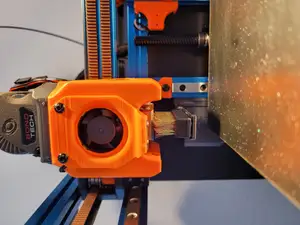
Voron 0 V0 A1 Mini Nozzle Brush Servo Arm
Printables

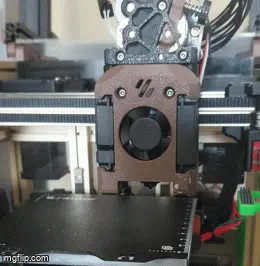
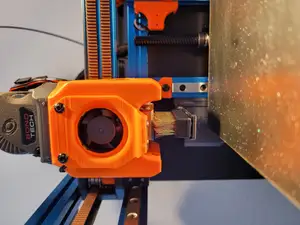
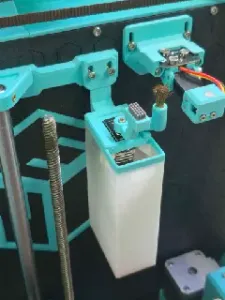
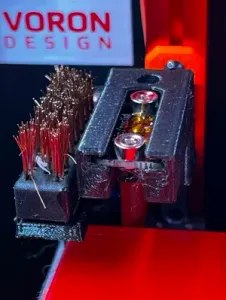
Combine the sideswipe probe with a nozzle brush, use a single servo for two functions, no build volume loss (I've ensured that the brush does not collide with the printhead)
You will want to print this with supports, with the bolt head side down on the plate
This has been tested with a SideSwipe probe using a Dragonburner V8 with a TZ V6 2.0 hotend using a V6 nozzle
Use generic Bambu A1 Mini brushes
I've attached the step and fusion files for adjustments to get better to fit on your setup
Add this to your klipper config to add a macro to clean the nozzle use CLEAN_NOZZLE as you need it, it will remember if the probe was attached or detached before wiping and restore back to that state
[gcode_macro _CLEAN_NOZZLE] gcode: {% set ITERS = 3|int %} ; Set cleaning cycles {% set X_MIN = 119|float %} ; Set the leftest X position where nozzle is over the brush {% set X_MAX = 120|float %} ; Set the rightest X position where nozzle is over the brush {% set Y_MIN = 1|float %} ; Set latest Y position where nozzle is over the brush {% set Y_MAX = 23|float %} ; Set earliest Y position where nozzle is over the brush {% set SPEED_FAST = 5000|int %} ; Speed for cleaning slowly {% set SPEED_NORMAL = 3600|int %} ; Speed for cleaning fast {% set SAFE_Z_HEIGHT = 25|float %} ; Minimum height bed should be so it doesn't collide with the probe etc
SAVE_GCODE_STATE
{% set HOLDING_PROBE = printer.probe.last_query|int %} {% if HOLDING_PROBE == 0 %} SS_STOW_PROBE {% endif %}
G90 {% set CURRENT_Z = printer.toolhead.position.z %} {% if CURRENT_Z < SAFE_Z_HEIGHT %} G1 Z{ SAFE_Z_HEIGHT } F{ SPEED_FAST } ; Only move Z if we need to, this should allow you to clean the nozzle post print {% endif %} G1 X{ X_MAX } Y{ Y_MIN } F{ SPEED_FAST } ; Go init place
SS_DEPLOY
{% for _ in range(0,ITERS) %} G1 Y{ Y_MAX } F{ SPEED_NORMAL } G1 Y{ Y_MIN } F{ SPEED_NORMAL } G1 Y{ Y_MAX } F{ SPEED_FAST } G1 X{ X_MIN } F{ SPEED_FAST } G1 Y{ Y_MIN } F{ SPEED_FAST } G1 X{ X_MAX } F{ SPEED_FAST } G1 Y{ Y_MAX } F{ SPEED_FAST } G1 X{ X_MAX } F{ SPEED_NORMAL } G1 Y{ Y_MIN } F{ SPEED_NORMAL } {% endfor %}
SS_RETRACT {% if HOLDING_PROBE == 0 %} SS_TAKE_PROBE {% endif %}
RESTORE_GCODE_STATE MOVE=1 MOVE_SPEED={ SPEED_NORMAL } ; return to starting position
[gcode_macro CLEAN_NOZZLE] gcode: Query_Probe G4 P250 ; possibly not needed _CLEAN_NOZZLE
Also you might find yourself wanting to update the SideSwipe's stowing macros so they only move the Z if outside of safe limits
[gcode_macro SS_TAKE_PROBE] gcode: {% set CURRENT_Z = printer.toolhead.position.z %} {% if CURRENT_Z < printer["gcode_macro SS_PICKUP_POS"].z %} G1 Z{printer["gcode_macro SS_PICKUP_POS"].z} F5000 {% endif %} G1 X{printer["gcode_macro SS_PICKUP_POS"].x - 20} Y{printer["gcode_macro SS_PICKUP_POS"].y} F5000 SS_DEPLOY G1 X{printer["gcode_macro SS_PICKUP_POS"].x} G1 Y{printer["gcode_macro SS_PICKUP_POS"].y + 50} G1 X{printer["gcode_macro SS_PICKUP_POS"].x - 20} SS_RETRACT
[gcode_macro SS_STOW_PROBE] gcode: {% set CURRENT_Z = printer.toolhead.position.z %} {% if CURRENT_Z < printer["gcode_macro SS_PICKUP_POS"].z %} G1 Z{printer["gcode_macro SS_PICKUP_POS"].z} F5000 {% endif %} G1 X{printer["gcode_macro SS_PICKUP_POS"].x - 20} Y{printer["gcode_macro SS_PICKUP_POS"].y + 50} F5000 SS_DEPLOY G1 X{printer["gcode_macro SS_PICKUP_POS"].x} G1 Y{printer["gcode_macro SS_PICKUP_POS"].y} F2000 G1 X{printer["gcode_macro SS_PICKUP_POS"].x - 20} F5000 SS_RETRACT This should allow you to wipe after printing




Названия используются только для указания источника результата. Polyzon не аффилирован с перечисленными площадками.