
Бесплатно 
Klipper Printer Additions 3.0b9.1 - More Than Boring Start-G-Code
Printables


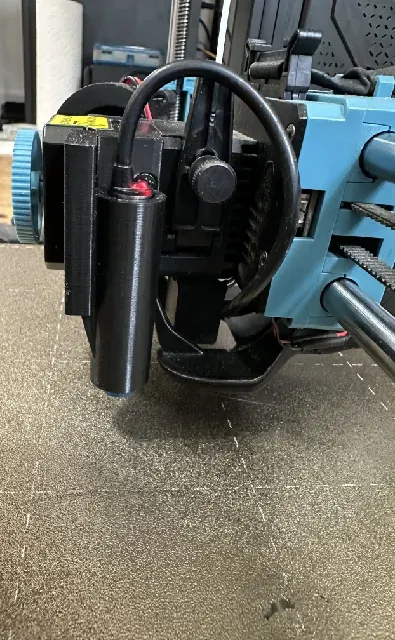
Sovol SV06/SV06 Plus/SV07/SV07 Plus Upgraded Probe Mount
This is an upgraded probe mount designed for the Sovol SV06, SV06 Plus, SV07, and SV07 Plus.
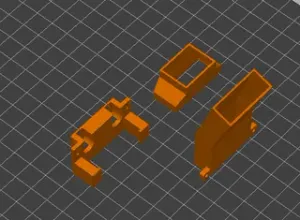
Print the model as provided in the STL or 3MF file. No changes to the model orientation are required.
Installation
The main toolhead mount uses the original toolhead mounting screws , so no additional hardware is required to attach it to the toolhead.
The probe holder attaches to the toolhead mount using:
- 2 × M3 × 10 mm countersunk-head screws
- 2 × M3 nuts
Klipper Configuration
For users running Klipper, this mount uses the following probe offsets on the SV06, SV06 Plus, SV07, and SV07 Plus .
Add these values to the [probe] section of your printer.cfg :
x_offset: 29.6 y_offset: -24.8 SV06
Add or update these values in the [bed_mesh] section of your printer.cfg :
mesh_min: 30, 7 mesh_max: 212, 200 SV06 Plus
Add or update these values in the [bed_mesh] section of your printer.cfg :
mesh_min: 30, 25 mesh_max: 277, 280 SV07
Add or update these values in the [bed_mesh] section of your printer.cfg :
mesh_min: 15,0 mesh_max: 220,198 SV07 Plus
Add or update these values in the [bed_mesh] section of your printer.cfg :
mesh_min: 20, 10 mesh_max: 288, 277 Z Offset
The Z offset must be recalibrated after installing this mount. The physical position of the probe has changed, so your previous Z offset should not be assumed to be correct.
After installing the mount:
- Update the X/Y probe offsets.
- Recalibrate the Z offset.
- Create a new bed mesh.
Do not reuse the old bed mesh from the previous probe mount.
Stock Sovol Firmware
The stock SV06 and SV06 Plus firmware is based on Marlin. Unlike Klipper, the probe X/Y offsets are defined in the firmware source, so using this mount with the stock firmware requires the firmware to be modified, recompiled, and flashed .
Sovol provides the official firmware source code on GitHub:
SV06: https://github.com/Sovol3d/Sv06-Source-Code
SV06 Plus: https://github.com/Sovol3d/SV06-PLUS
The general process is:
- Download or clone the appropriate Sovol firmware source code.
- Open the project in Visual Studio Code with the PlatformIO extension installed.
- Locate the probe-offset settings in the Marlin configuration.
- Change the probe offsets to:
- X: 29.6 mm
- Y: -24.8 mm
- Compile the firmware using PlatformIO.
- Flash the resulting .bin firmware file to the printer using the normal Sovol firmware-update procedure.




Названия используются только для указания источника результата. Polyzon не аффилирован с перечисленными площадками.