
Бесплатно 
EVA 3 Neopixel Shroud Worklight and Logo
Printables


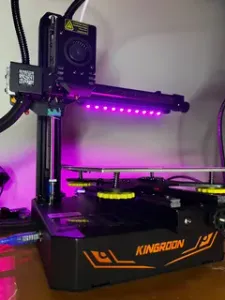
This is a remix of the EVA 3 Tank shroud with 2 pcb button neopixel, one in the logo and another to the print part.
For the top led, one file takes M3 x 3mm heatinserts and the other screws into the plastic.
For the bottom led it was a tab to hold it
This is my klipper config to enable the NeoPixel green on full time and turn on an off the white light:
Create a file named Neopixel.cfg
In there:
[neopixel board_rgb] pin: PB0 chain_count: 2 color_order: GRBW initial_RED: 0 initial_GREEN: 0 initial_BLUE: 0 initial_WHITE: 0
[delayed_gcode Welcome_0] initial_duration: 0 gcode: SET_LED LED=board_rgb RED=0.0 GREEN=0.0 BLUE=0.0 WHITE=0.0
[delayed_gcode Welcome_1] initial_duration: 0.1 gcode: SET_LED LED=board_rgb RED=0 GREEN=0.1 BLUE=0 WHITE=0.0 INDEX=1 TRANSMIT=1
[delayed_gcode Welcome_2] initial_duration: 0.2 gcode: SET_LED LED=board_rgb RED=0 GREEN=0 BLUE=0 WHITE=1.0 INDEX=2 TRANSMIT=1
[gcode_macro LED_OFF] gcode: SET_LED LED=board_rgb RED=0 GREEN=1 BLUE=0 WHITE=0 INDEX=1 TRANSMIT=0 SET_LED LED=board_rgb RED=0 GREEN=0 BLUE=0 WHITE=0 INDEX=2 TRANSMIT=1
[gcode_macro LED_ON] gcode: SET_LED LED=board_rgb RED=0 GREEN=1 BLUE=0 WHITE=0 INDEX=1 TRANSMIT=0 SET_LED LED=board_rgb RED=0 GREEN=0 BLUE=0 WHITE=1 INDEX=2 TRANSMIT=1
On the Printer.cfg add:
[include Neopixel.cfg]
On the Macro to start the print:
gcode: LED_ON
On the Macro to end the print:
gcode: LED_OFF
I'm no expert on klipper but this conf worked for my V-core
Any suggestion is wellcome
Enjoy


Названия используются только для указания источника результата. Polyzon не аффилирован с перечисленными площадками.