
Бесплатно 
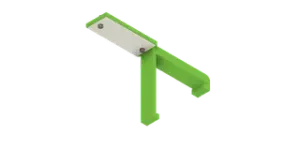
Glue Stick holder for Wanhao Duplicator i3
MyMiniFactory


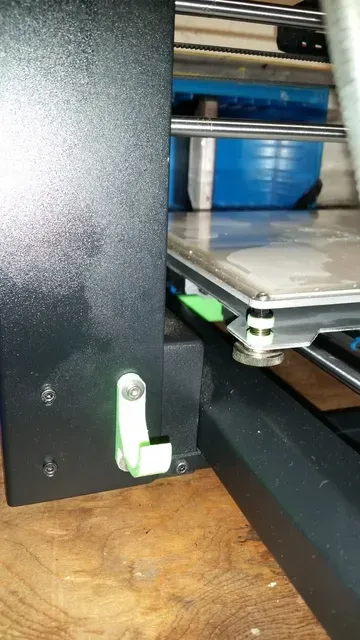


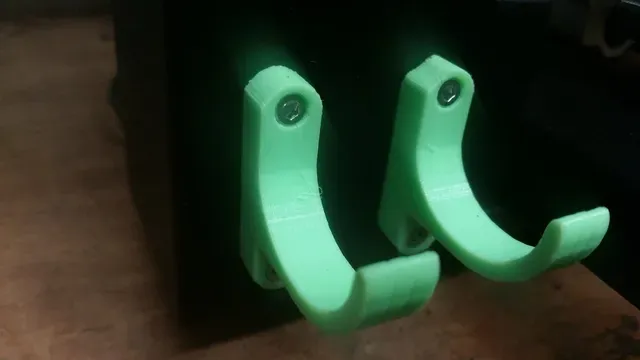


Some of the photos were take in portrait (vertical) because I wanted to capture more of the printer. If you click on the four arrows in the top right of the image you can see the whole image.
With my Wanhao Duplicator i3 ( it should also work with the Monoprice Maker Select and the Alidi Cocoon Create since they are clones of each other) I like having my commonly used tools (tweezers, part scraper, cutters for the filament) attached to my printer. That way when I need to use one of them, all I have to do is just reach to what ever side they are attached on and remove it. This becomes really handy since I don't have to locate where I placed them last.
I use a glass bed with my printer and a glue stick (Elmer's All Purpose glue stick sized 0.77 oz, it is about 27 mm in diameter) to hold my prints down. I wanted a way to attach my glue stick to my printer but not make it super difficult to remove. I came up with this design and it can also be used to hold anything under about 30 mm.
This can be attached to either side of the printer where the four bolts are located on the Z / X axis section. You can see the location in the images.
You will need to replace the four M3 x 5 mm bolts with M3 x 10 mm bolts and I also used washers to help. I bought my bolts and washers for this mod and other mods at: https://www.trimcraftaviationrc.com/index.php?route=common/home
Edit 10/8/16:
I have included a version that allows the bolts to be recessed in so they sit flush. The file is called "recessed glue stick holder". With the recessed version you want to put the glue stick back with the cap facing towards the inside of the printer. If you put it the other way the weight of the glue causes it to fall off.
Filament is Just PLA's lime green: https://www.justpla.com/pla175mm/green-play175-1kg?limit=100
Print Settings
Printer:
Wanhao Duplicator i3
Rafts: No
Supports:
No
Resolution: 0.2
Infill:
50%
Notes:
If you print the holder exactly as it is loaded in your slicer software it should work fine. I printed mine this way so the hot end cooling fan would keep the holes fairly round to be able to insert the bolts in.
Post-Printing =============
I did not have to clean anything up.
You will need to replace the four M3 x 5 mm bolts with M3 x 10 mm bolts and I also used washers to help. I bought my bolts and washers for this mod and other mods at: https://www.trimcraftaviationrc.com/index.php?route=common/home
How I Designed This
Designed in TinkerCAD. I am trying to learn the full ability of TinkerCAD at the same time.
Category: 3D Printer Accessories



Названия используются только для указания источника результата. Polyzon не аффилирован с перечисленными площадками.
Комментарии