
Бесплатно 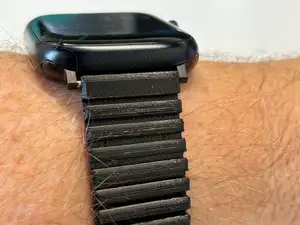
Flexible Watch Band with Soft Lock Clasp
MakerWorld


A fully filament* link watch band with microadjust clasp for 22 mm lugs.
*Spring bars required. Unprinted filament used as hinge material.
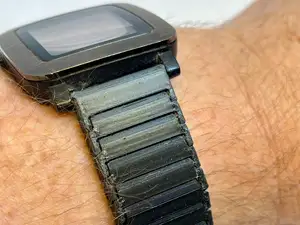
I wanted a link band that wasn't silver, gold or black, and I wanted all the features of a regular link watch band, so I made this over the course of three or four days. This design features a flared under/inner link set and a repeating pill shaped over/outer link set.
To introduce microadjust to a fully plastic band it required a novel design for the clasp. The design involves a key with teeth, and a jaw with teeth on one side and a somewhat flexible smooth backing. When inserted, they mesh, and the keeper slides into place over a bump, supplying the necessary force to keep the teeth engaged.
Prep…
Print the hole tests. they range from 1.95 - 2.22 mm, .03 mm difference per hole.
Grab the filament you will use as pins and test the fit.
In the parametric .f3d model,
- set “tighthole” to the smallest hole in the horizontal hole test you can get the filament into. This changes the holes in the end links and the under/inner links.
- set "sliphole" to a hole size in the horizontal hole test that allows the pin to freely spin and be pushed through. This changes the holes in the over/outer links.
- set “clasptightholes” to the smallest hole size in the vertical hole test that you can get the filament into and out of without requiring tools. This changes the holes in the jaw and key. For some reason the jaw and key printed tighter than the test for me. Keep this in mind.
- set “springbar” to a hole size that comfortably fits a spring bar without wiggling.
Additional parameters:
interlinktolWIDTH - defines the clearance between the over/outer and under/inner link where they meet at the pin.
interlinktolLONG - defines the clearance between the links lengthwise. This probably won't need adjustment.
Printing…
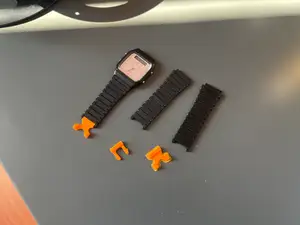
Under/inner links and end links can be printed with their flat side down. The end links have supports included which can be broken off without tools.
Over/outer links can be printed with the wider flat side down, or upside down as they would be imported into a slicer.
The keeper will import 3 degrees off from flat. Make sure it is flat and on an open side.
The jaw and key must be printed on their sides. I recommend putting them on opposite sides so that any elephants foot doesn't double on one side. These REQUIRE supports.
Assembly…
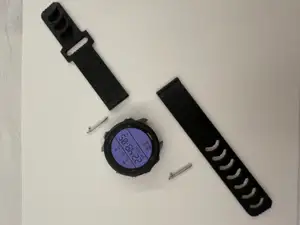
Gather your parts and the filament for the pins.
Break off supports and clean up any stringing. Check inside the jaw for extra filament that needs to be removed.
Cut the filament slightly larger than the width of the under/inner links.
NOTE: Use the hole tests to stabilize the filament pins as you push it in.
Push in the filament, it may be necessary to “hammer” it down with something. Make sure the over/outer link is in place before the pin gets through the center.
The widest flared under/inner link goes next to the end link, and the smaller flared under/inner link goes next to that with the divot in its center facing the end link.
If necessary, the printer nozzle, a 3D pen, or a soldering iron can be used to melt the pins into the under/inner links to keep them in place permanently.
There is no correct orientation for this kind of clasp. I found it easiest to place an extra link and the “jaw” on the outside of my wrist and the “key” on the inside.
Wearing…
The clasp can be adjusted about the length of one link before it becomes sketchy. Try to size it so the clasp is as close to closed as possible when wearing.





Названия используются только для указания источника результата. Polyzon не аффилирован с перечисленными площадками.
Комментарии