
Бесплатно 
Wedding Drink Name Tags Generator - OpenSCAD
Thingiverse
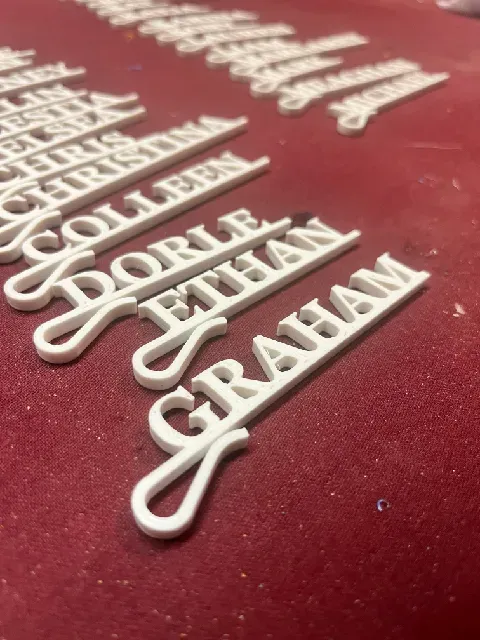


UPDATE! - April 2025
I made a little github project page where it will generate the right python script for you and make this super simple. Improved Windows support and Mac support too.
https://drehelm.github.io/wedding-name-tag-generator/
----------------------------------------------------------------------------
My sister is getting married and she asked me to make a bunch of name tags for seat placements. I saw the cool project by @LarsPrintingSolution ( https://www.printables.com/model/286409-individual-nametag-for-glasses-and-cups-wedding-de ) however I wasn't going to manually make and edit dozens of names.
So I made my very first OpenSCAD project…. it combines an SVG I made and some rather manual shifting of the letters for a very specific font ("STIX Two Text" https://fonts.google.com/specimen/STIX+Two+Text ) to come up with this mess of a model :P
And then I wrote a little Python script that goes and generates the whole list of names for me and outputs the STL's.
A few hours of work to save me a couple hours of work? Worth it. Hahahaha
✅ What You Need to Install
1. OpenSCAD
- Download and install from here: https://www.openscad.org/downloads.html 2. Python 3
- Download and install from here: https://www.python.org/downloads/ ✔ Windows users : Be sure to check " Add Python to PATH " during installation! 3. Stix Two Text Font
- Download the font: https://fonts.google.com/specimen/STIX+Two+Text - Click " Download family " and unzip the folder. - Install the STIXTwoText-Regular.ttf font file: On Mac:
- Double-click STIXTwoText-Regular.ttf - Click " Install Font " On Windows:
- Right-click STIXTwoText-Regular.ttf - Select " Install for all users " 📁 Download Project Files
Place these three files in a single folder (e.g., STLGenerator ):
- generateNames.py - templatev2.scad - Clip1.svg Step 1: Install the Prerequisites
- OpenSCAD - Python 3 - Stix Two Text font Step 2: Add Names
Open generateNames.py in a plain text editor .
- Mac: Use TextEdit (set to plain text ) - Windows: Use Notepad - Advanced users: VS Code, Sublime Text, etc.
Replace the placeholder names with your own. Original example:
names = [ "THIS", "IS", "A", "LIST", "OF", "NAMES" ]
Your custom names:
names = [ "JEANLUC", "WILL", "WESLEY", "BEVERLY", "DEANNA", "GEORDI" ]
✔ Tips:
- All uppercase works best - Separate names with commas - You can list as many names as you want Step 3: Test the Setup
On Mac/Linux
- Open Terminal - Navigate to your folder: cd ~/Desktop/STLGenerator - Run the test: python3 generateNames.py test On Windows
- Open Command Prompt - Navigate to your folder: cd C:\Users\YourName\Desktop\STLGenerator - Run the test: python generateNames.py test ✔ If everything works, you'll see:
- OpenSCAD detected - Template file found - Output folder ready user@M2-MacBook STLGenerator % python3 generateNames.py test Testing setup... Using OpenSCAD at: /Applications/OpenSCAD.app/Contents/MacOS/OpenSCAD OpenSCAD version info: Template file found: /Users/user/Desktop/STLGenerator/templatev2.scad Output directory ready: /Users/user/Desktop/STLGenerator/output_stls All tests passed. Step 4: Generate Your STL Files
On Mac/Linux
python3 generateNames.py
On Windows
python generateNames.py
The script will create .stl files in a folder called output_stls .
Check the output_stls folder inside your project folder:
STLGenerator/ ├── generateNames.py ├── templatev2.scad ├── Clip1.svg └── output_stls/ ├── JEANLUC.stl ├── WILL.stl └── ...
🛠 Troubleshooting
Problem Solution
OpenSCAD not found Verify it's installed. On Mac, check /Applications/OpenSCAD.app and add it to your PATH.



![Name Keychain Generator [NO AMS]](https://cache.polyzon.org/api/img?url=https%3A%2F%2Fmakerworld.bblmw.com%2Fmakerworld%2Fmodel%2FUSef44e767491c4a%2Fdesign%2F2025-12-14_4af77202c4f55.png&w=300)

Названия используются только для указания источника результата. Polyzon не аффилирован с перечисленными площадками.