
Бесплатно 
Derpy Tiger Wall Decor KPOP DEMON HUNTERS
Printables


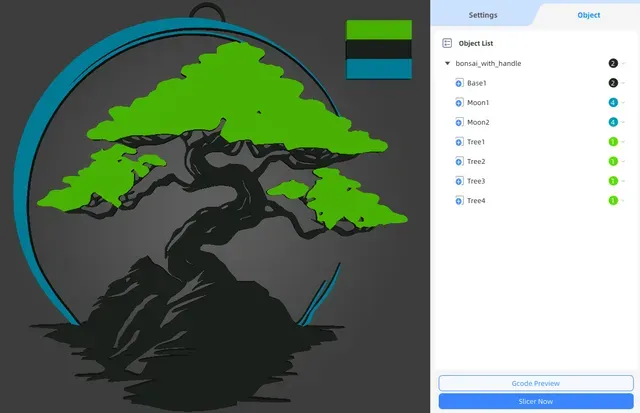
To multicolor please use ".3mf" files and set up colors in objects list. Remember to move away auto generated purge tower.
Thanks to adding new layers on moon and crown of the tree, i was able to separate this elements and allow to set up new color for each object on the final layers. Additionally, I made it possible to hang it on the wall, but in files there is also model without handle.
The best scenario is to use GLOW IN THE DARK filament, but feel free to use CASUAL colors :D
Files legend: -"bonsai_preconfigured.3mf" - default model with handle/mount to wall and preconfigured colors -"bonsai_with_handle.3mf" - model with handle/mount to wall -"bonsai_with_editable_handle.3mf" - model with handle/mount to wall as separate object (you can scale handle separately) -"bonsai_without_handle.3mf" - model with removed handle/mount to wall -"bonsai_without_multicolor.stl" - stl model, not recommended for multicolor
Objects legend: -"Base1" - bottom part of whole wall art -"Handle1" - handle/mount to wall (only in "bonsai_with_editable_handle.3mf" file) -"Moon1" - upper part of moon -"Moon2" - lower part of moon -"Tree1" - left part of tree crown -"Tree2" - middle part of tree crown -"Tree3" - smaller right part of tree crown -"Tree4" - bigger right part of tree crown







Названия используются только для указания источника результата. Polyzon не аффилирован с перечисленными площадками.