
Бесплатно 
Nozzle cleaner holder (Neptune 4, Neptune 4 PRO) - 4mm Brush
Printables
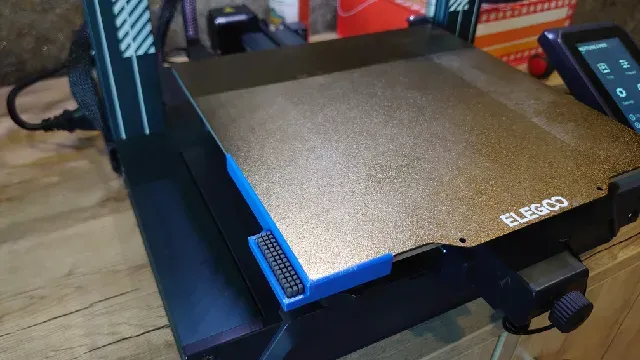


Printing
For printing, I use PETG or a more heat-resistant material. (PLA and flexible materials are not suitable). Fill density: 15%, no brim, layer height: 0.2 mm.
Preparation for Installation
After printing, take the silicone rubber for the BambuLab A1 printer. Stick it into the groove using the original adhesive tape (it is sufficient).
Installation on the Printer
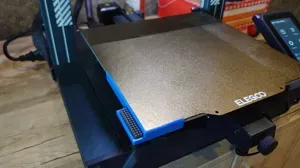
For attachment, you can use temperature-resistant double-sided tape or sealant. In my case, the foam acrylic-based tape is sufficient. Remove the backing from the tape and attach the part to the front-left corner of the print bed. If you're using a sealant, secure the part with clamps to the print bed and wait for it to cure.
Macro Preparation
Turn on the printer. Go to the web interface and locate the printer.cfg file in the configuration tab. Add the macro from Appendix A to the file. Save the changes and restart the printer.
Now you will have a macro that you can use manually through the web interface or by adding it to the start G-code for automatic execution before printing.
Appendix A
[gcode_macro CLEAN_NOZZLE] description: Cleaning the nozzle using a brush gcode: {% set EXTRUDER_TEMP = params.EXTRUDER_TEMP|default(170)|float %}
G28 # Raise the nozzle to avoid contact with the model G90 G1 Z10 F3000 ; Raise the nozzle by 10 mm G1 X0 Y50 F10000 ; Moving to the brush
G91 G1 X-7.5 F6000 G90
{% if printer.extruder.temperature < EXTRUDER_TEMP %} M109 S{EXTRUDER_TEMP} {% endif %} G92 E0 ;Reset Extruder
M106 S255 G1 E30 F200 ; Extrude 30 mm of filament at a speed of 200 mm/minute G92 E0 ;Reset Extruder
G1 Z-2 F1200 ; Setting the height of the cleaning nozzle M106 S0
# Perform combined Y-axis and sinusoidal X-axis cleaning motion G91 ; Enable relative positioning ; First pass G1 X0.3 Y-48 F15000 ; Move diagonally (right/up) G1 X-0.6 Y48 F15000 ; Move diagonally (left/up) G1 X0.6 Y-48 F15000 ; Move diagonally (right/up) G1 X-0.3 Y48 F15000 ; Move diagonally (left/up) ; Second pass at higher speed G1 X0.3 Y-48 F45000 ; Move diagonally (right/up) G1 X-0.6 Y48 F45000 ; Move diagonally (left/up) G1 X0.6 Y-48 F45000 ; Move diagonally (right/up) G1 X-0.3 Y48 F45000 ; Move diagonally (left/up) ; Final pass at maximum speed G1 X0.3 Y-48 F15000 ; Move diagonally (right/up) G1 X-0.6 Y48 F15000 ; Move diagonally (left/up) G1 X0.6 Y-48 F15000 ; Move diagonally (right/up) G1 X-0.3 Y48 F15000 ; Move diagonally (left/up) G90 ; Return to absolute positioning
G1 Z10 F3000 ; Raising the nozzle after cleaning
G1 X0 Y50 F6000 ; Move to the starting position of the table Detailed Explanation
This macro is designed to automate the process of cleaning the printer's nozzle using a brush mounted on the print bed. The process starts with homing the printer using the G28 command, followed by raising the nozzle (Z10) to avoid interference with any existing prints. The nozzle then moves to the starting position near the brush (X150 Y0).
To ensure that any long plastic strands (e.g., stringing or ooze) from the nozzle are cleared before the actual cleaning process, the nozzle performs a series of quick movements along the X-axis (from X145 to X155 and back). This is done to help "wipe off" any excess filament that may have accumulated during previous prints, ensuring the nozzle is clean and ready for more precise cleaning.
Once the X-axis movement is complete, the nozzle switches to relative positioning (G91) and lowers to a cleaning height (Z-2). The nozzle then performs a sinusoidal motion along the Y-axis while simultaneously oscillating slightly along the X-axis (with an amplitude of 0.3 mm). This ensures thorough cleaning of the nozzle as it moves back and forth across the brush, with the motion speed varying (F15000 and F45000) to adapt to different levels of intensity.
After completing the cleaning routine, the nozzle is raised again (Z10) and returned to the starting position (X0 Y0), ready for the next operation.
This macro efficiently handles both filament cleanup and nozzle cleaning, preventing blockages and ensuring high-quality prints by automating the process.
Attention
Please note that depending on the adhesive material, the height of the counters will vary, so you will need to adjust the Z axis yourself.
Used brush for A1
Appendix B (OLD VERSION January 4, 2025)
[gcode_macro CLEAN_NOZZLE] description: Nozzle cleaning using a brush gcode: G28 # Raise the nozzle to avoid contact with the model G90 G1 Z10 F3000 ; Raise the nozzle by 10 mm
G1 X150 Y0 F6000 G1 X145 Y0 F45000 G1 X155 Y0 F45000 G1 X145 Y0 F45000 G1 X155 Y0 F45000 G1 X145 Y0 F45000 G1 X155 Y0 F45000 G1 X0 Y0 F45000 ; Move to the brush position # Move to the starting position of the brush G91 G1 X-7.5 F6000 G90 # Lower the nozzle to the cleaning height G1 Z-2 F1200 ; Set nozzle height for cleaning
# Perform combined Y-axis and sinusoidal X-axis cleaning motion G91 ; Enable relative positioning ; First pass G1 X0.3 Y45 F15000 ; Move diagonally (right/up) G1 X-0.6 Y-45 F15000 ; Move diagonally (left/up) G1 X0.6 Y45 F15000 ; Move diagonally (right/up) G1 X-0.3 Y-45 F15000 ; Move diagonally (left/up) ; Second pass at higher speed G1 X0.3 Y45 F45000 ; Move diagonally (right/up) G1 X-0.6 Y-45 F45000 ; Move diagonally (left/up) G1 X0.6 Y45 F45000 ; Move diagonally (right/up) G1 X-0.3 Y-45 F45000 ; Move diagonally (left/up) ; Final pass G1 X0.3 Y45 F15000 ; Move diagonally (right/up) G1 X-0.6 Y-45 F15000 ; Move diagonally (left/up) G1 X0.6 Y45 F15000 ; Move diagonally (right/up) G1 X-0.3 Y-45 F15000 ; Move diagonally (left/up) G90 ; Return to absolute positioning
G1 Z10 F3000 ; Raise the nozzle after cleaning
# Return to the initial position G1 X0 Y0 F6000 ; Move back to the starting position of the bed


![[Neptune 4/pro] Nozzle Clean brush](https://cache.polyzon.org/api/img?url=https%3A%2F%2Fmedia.printables.com%2Fmedia%2Fprints%2F741231%2Fimages%2F5788846_9a20f7f1-2887-450a-a9a2-a136219511df_bfa8375c-1406-4d0d-aa72-780b338ac91b%2Fimg_0455.jpeg&w=300)



![Elegoo Neptune 4/Pro OrcaSlicer V2.0.0 config [New Firmware]](https://cache.polyzon.org/api/img?url=https%3A%2F%2Fmedia.printables.com%2Fmedia%2Fprints%2F609896%2Fimages%2F6512090_0000f0c6-71c5-412c-915d-776f786325d3_f907e120-f93d-475e-8798-5d4567f5e812%2Fbanner-orca-slicer.webp&w=300)

Названия используются только для указания источника результата. Polyzon не аффилирован с перечисленными площадками.